Buildify Cloud
Buildify Cloud gives your Web App a full backend — database, authentication, file storage, secrets management, and more — without leaving the Buildify workspace. It's powered by Supabase, an open-source backend platform built on PostgreSQL.
When you connect Buildify Cloud to your project, the AI becomes aware of your backend setup and can generate code that reads from and writes to your database, authenticates users, and handles file uploads automatically.
When do you need Buildify Cloud?
Buildify Cloud is useful when your Web App needs to:
- Store data — User submissions, bookings, inventory, blog posts, etc.
- Authenticate users — Let visitors sign up, sign in, and manage sessions
- Handle file uploads — Profile photos, documents, or any user-generated files
- Keep secrets safe — Store API keys and sensitive config values securely
- Monitor activity — Debug errors and track what's happening in your app
A simple static site or landing page doesn't need Buildify Cloud. If you want your app to do things with real data and real users, this is the right next step.
Opening Buildify Cloud
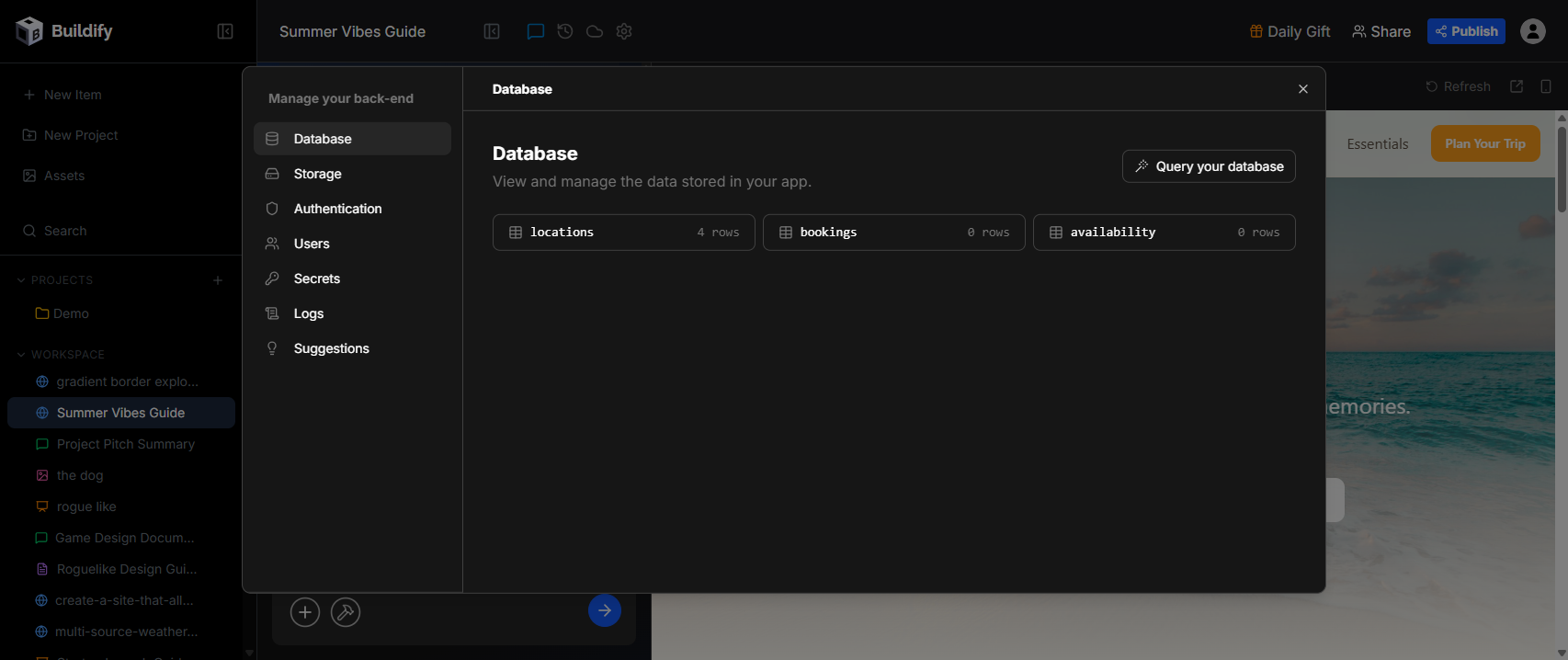
Click the cloud icon in the Web App workspace toolbar to open the Manage your back-end panel. The panel has six sections in the left nav:
- Database
- Storage
- Authentication
- Users
- Secrets
- Logs
- Suggestions
Database
The Database section shows all the tables in your app's PostgreSQL database. Each table is listed with its name and row count.
Click Query your database to run SQL queries directly against your data — useful for inspecting rows, testing queries, or making one-off data changes.
The AI uses your database schema automatically when you ask it to build features like forms, dashboards, or admin panels.
Storage
Storage lets you manage file buckets — containers for storing and serving files in your app (images, documents, uploads, etc.).
If no buckets exist yet, you can ask the AI to create one: "Set up a storage bucket for user profile photos." The AI will create the bucket and wire up the upload logic in your code.
Authentication
Authentication controls how users sign up and sign in to your app. Buildify Cloud (via Supabase) handles the full auth flow — sessions, tokens, and security — so you don't have to build it from scratch.
General Settings
- Disable Signup — Prevent new users from creating accounts (useful for invite-only apps)
- Allow Anonymous Sign-ins — Let users access your app without creating an account
Sign in methods
Configure which sign-in methods are available to your users:
- Email — Standard email and password sign-in
- Phone — SMS-based sign-in with a phone number
- Google — OAuth sign-in with a Google account
Enable or disable each method and configure provider settings (like OAuth credentials) from this section.
Users
The Users section shows a chart of new user signups over time (last 90 days by default) and a live view of recent users from your auth.users table.
Use this to monitor growth, spot unexpected signups, or verify that your auth setup is working correctly after testing.
Secrets
Secrets is where you store sensitive values your app needs — API keys, webhook secrets, third-party service credentials — without hardcoding them into your code.
To add a secret:
- Enter a name (e.g.
STRIPE_SECRET_KEY) - Enter the value
- Click Create Secrets
Once saved, secrets are available to your app's backend code as environment variables. Ask the AI to use a secret by name: "Use the STRIPE_SECRET_KEY secret to process payments."
Logs
The Logs section shows edge function logs and activity from your app's backend. Use this to debug errors, inspect function output, and trace unexpected behavior in your app.
Suggestions
Suggestions analyzes your backend configuration and flags potential security and performance issues. Each suggestion is labeled with a severity level:
- WARN — Security issues that should be addressed (e.g. an RLS policy that grants unrestricted access)
- INFO — Performance improvements (e.g. unused database indexes, suboptimal connection settings)
Review suggestions regularly, especially before launching your app publicly. You can ask the AI to fix any flagged issue directly: "Fix the RLS policy warning on the bookings table."
How the AI uses Buildify Cloud
Once Buildify Cloud is connected, the AI reads your database schema, storage configuration, and auth setup automatically. You can ask it to:
- "Add a contact form that saves submissions to the database"
- "Create a user login page with email and Google sign-in"
- "Build an admin dashboard showing all rows from the bookings table"
- "Set up row-level security so users can only see their own data"
- "Add a profile photo upload that saves to the storage bucket"
The AI writes the correct Supabase client code, handles auth flows, and wires everything together — you just describe what you want.